

Practical Business and Technical Guide to 3D Product Configurators
In this article, Jakub Bily shares a practical approach to choosing the right configurator. When 2D makes sense, when 3D is the better fit, and when it’s worth adding AR as a bonus. He explains what typically has the biggest impact on development budget and how integration with an e-commerce platform, ERP, or production workflows can reshape the entire sales process. The article also briefly touches on the technical side of building a 3D configurator, including integration with existing systems. All of this based on real-world experience.

Head of Business Development

On this page(36)
- What is a web configurator and what types exist today?
- Commonly available web versions of configurators
- 2D vs 3D and the difference for users and budgets
- From the user's perspective
- From the perspective of complexity, price, and risks
- What directly affects the price of the configurator (a practical checklist for you)
- Can the 3D configurator help salespeople?
- → Will the configurator speed up the salesperson's work?
- → Will product visualization help when selling to clients?
- → How much time does the company waste today on repeated product inquiries, and who handles them?
- → What percentage of orders are currently processed manually by sales representatives, and how much could be automated?
- Working with data, or "Can you take the data for the configurator from our system?"
- → The data is directly in the backend (administration) of the configurator
- → The configurator draws data from the client's backend (ERP / existing admin or third-party data).
- Hybrid model
- AR (augmented reality) – how to integrate it correctly and why it is important for business
- Business reasons why AR makes sense
- Why AR is more technically challenging than it looks
- AR formats and differences between iOS and Android
- Two strategies for AR variants
- Shopping cart, order, warehouse, shipping, and PDF invoices
- What if you want to integrate the configurator even further, e.g. with your production facilities?
- Are the configurators limited in any way?
- →Technical limits
- → Business limits
- How can I verify a new product in the configurator before deploying it to the production website?
- Full-page configurator (full screen) or just as part of the product page?
- What is the most common way to integrate the configurator into existing solutions?
- iFrame
- API / Native Integration
- Data is fundamental, and without the right information, both the configurator and the business suffer
- GLB/GLTF as a standard for the web and why it is practical
- Example on an office chair product
- How rendering works in a browser and why optimization is crucial
- What happens in the background - pre-calculation, logic, and configuration preparation
- Final ideas and practical takeaways
Welcome to an era where a "standard offer" is no longer enough. Modern customers don't want products off the shelf, they want products they have customized themselves or that come with excellent service. 3D configurators have thus gone from being a luxury accessory to an essential sales tool for many clients.
This article will guide you through the world of configurators, from the initial idea to integration into your internal systems, separating the business perspective from the technical one.
What is a web configurator and what types exist today?
A web configurator is a part of a website (or application) that allows users to configure a product from different variants and shows them the result (visually and often also in terms of price). It's not just about "clicking colors." The right configurator also handles compatibility, pricing, continuity, and sometimes even production and other related functions. At the same time, it helps your business through automation, answers repetitive questions, and saves time for your salespeople and other internal departments.
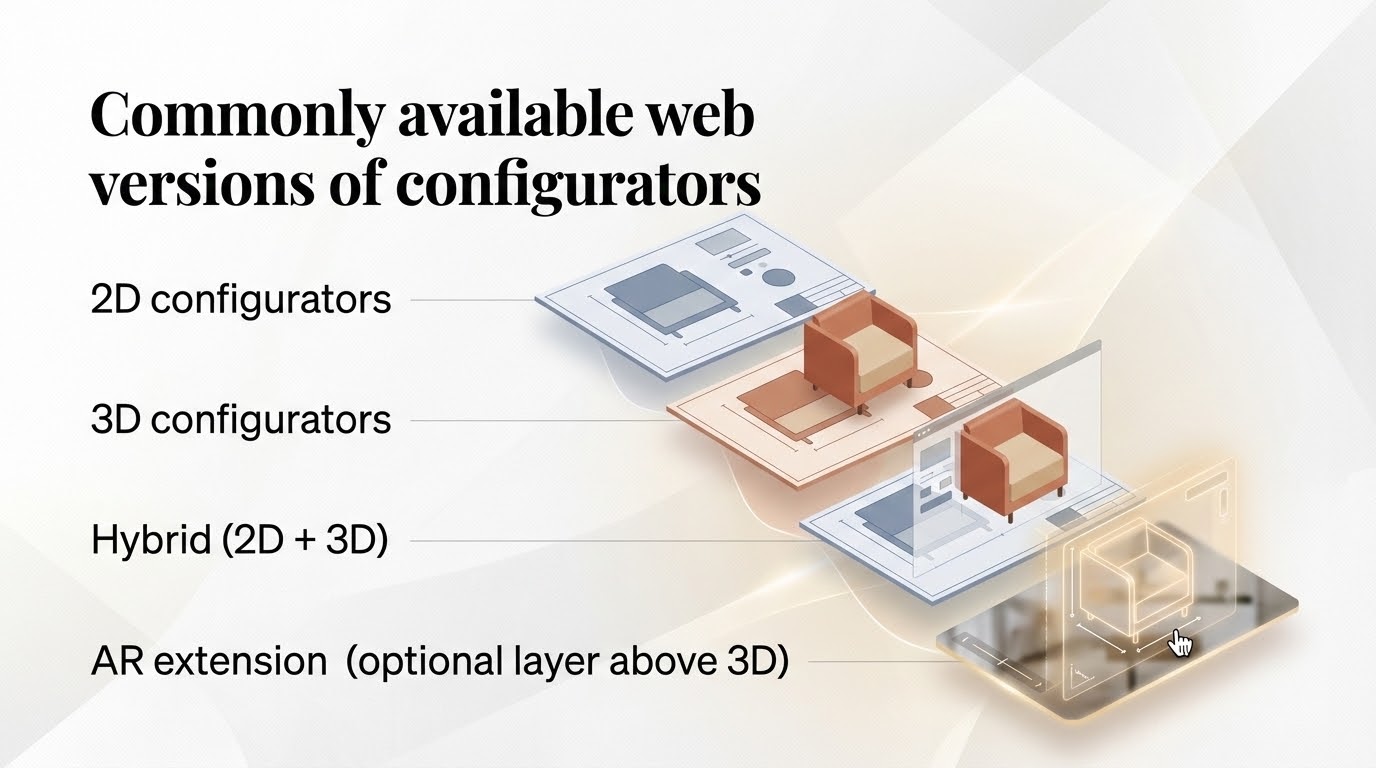
Commonly available web versions of configurators
2D configurators
Switching images (variant = different photo)
“Layering” (PNG/SVG layers on top of each other – colors, accessories)
Configuration of dimensions and texts (e.g., printing, engraving)
3D configurators
A real 3D model that is displayed to the user in the browser
The user changes parts of the model, materials, textures, dimensions, accessories, etc.
Hybrid (2D + 3D)
3D for the "main display" and 2D for quick steps (e.g., selecting fabrics as a 2D swatch)
Often the best compromise for performance and UX
AR extension (optional layer above 3D)
Users can use their phone or tablet (whether Android or iOS) to display a specific product or its variant in real space (depending on implementation).
web versions of configurators
2D vs 3D and the difference for users and budgets
From the user's perspective
2D is fast, simple, and often "sufficient" for cheaper/easier products.
3D visualization adds certainty, as customers can see the product from all angles, in context, and often examine the details at length, leading to greater confidence and a greater desire to order the product.
From the perspective of complexity, price, and risks
3D model viewer is more expensive not only because of the complex scene rendering, but mainly because of:
preparation of 3D data (optimization, materials, UV, textures)
model assembly logic (parts, "sockets", hierarchy, compatibility)
performance on mobile phones and tablets (the most common bottleneck)
testing (there can be hundreds to tens of thousands of combinations)
The most expensive part of a 3D configurator is often not the 3D itself, but the rules, integration, and smooth connection to your real-world operations.
What directly affects the price of the configurator (a practical checklist for you)
Features that typically increase the budget
2D vs 3D
Login / registration (depending on complexity, then saving configurations, history, abandoned cart, working with prices according to role, etc.)
Calculation of retail prices
Calculation of wholesale prices
Wholesale levels (e.g., prices according to customer / turnover / contract / additional discount / discount codes)
Fixed vs. percentage pricing
fixed surcharge for product accessories (e.g., armrests +$75)
Percentage of the base or current price of the product in the configuration (e.g., premium durable fabric +12%)
combination of both
Multi-currency and multilingual configurator
Interoperability and compatibility
E.g., The selection in step 2 will affect the availability of the variant or variants in step 5.
Alternatively, the entire step 5 is hidden / disabled based on the selection in step 2 (e.g., after selecting a specific backrest, it is no longer possible to select all clothing hanger options from the back of the backrest, or no additional hangers can be added).
Dimension configuration (parametric products)
Saving and sharing configurations (link, QR code, PDF, export, send to email)
Connection to ERP / warehouse / price lists, shopping cart, invoices
Generating production documentation (BOM, etc.)
Where does the data for the configurator come from and how does it flow?
Integration with your internal systems
and others.
The price of the configurator increases with the number of rules, combinations, integrations, user-friendly features, and also the (lack of) quality of data and other elements.
One of the first questions we recommend asking yourself is whether you need the configurator to serve only for product visualization or also for purchasing and delivery.
Can the 3D configurator help salespeople?
Yes, typically significantly. There are at least several different ways of looking at this:
Will the configurator speed up the salesperson's work?
Will product visualization help when selling to clients?
How much time does the company waste today on repeated product inquiries, and who has to deal with them? (often a combination of not only sales, but also billing and other departments)
What percentage of orders are currently processed manually by sales representatives, and how much could be automated?
Let's take a closer look.
→ Will the configurator speed up the salesperson's work?
Yes. The configurator filters out routine tasks, so salespeople don't have to repeatedly explain options, check compatibility, and manually put together offers. Clients can do this themselves, or they can send customers a link to the configuration, or go through the configuration with the client during a meeting and have the specifications, including the price, ready in a few minutes and send the order. In addition to saving time, this also reduces errors. The salesperson ceases to be a "human validator" of rules and becomes a consultant who addresses the customer's needs.
→ Will product visualization help when selling to clients?
Yes, because visualization reduces uncertainty and thus friction in decision-making. Customers can better imagine the product (especially in the case of more expensive or bulky items), more easily understand the differences between variants, and have less need to ask for details. In addition, they can immediately see prices at their price level. This works even more strongly with 3D / AR. The client sees the product from all sides, in the context of space, and has greater confidence that they are buying the right thing.
→ How much time does the company waste today on repeated product inquiries, and who handles them?
Surprisingly, a lot of time is wasted here, and it often spills over across departments. A typical scenario is that a customer asks their sales representative about compatibility, price, delivery date, shipping, or "whether this combination is possible." The sales representative answers part of the question, and the rest goes internally to support, production, warehouse, billing, or the product department, and the information is collected manually. This takes time for everyone involved.
The configurator can significantly reduce this load by:
make the rules visible (what can / cannot be selected),
provides an immediate summary of the configuration,
often calculates the price including retail / wholesale logic,
and can also add expected delivery dates/shipping according to the configuration.
→ What percentage of orders are currently processed manually by sales representatives, and how much could be automated?
This depends on the field, but generally speaking, the more variants and rules there are, the more manual work is involved. And it's not just about configuration; there's a lot of work behind the scenes. The following tasks are often performed manually:
checking that the configuration makes sense,
transcription into order / ERP,
calculation of the correct price (wholesale price, discounts, percentages, additional discounts),
preparation of documentation (PDF, specifications, BOM),
availability and shipping check.
The configurator can automate a large part of this process and reduce the number of errors made during the process.
Working with data, or "Can you take the data for the configurator from our system?"
As I mentioned in the previous section, the configurator is not just about visualization. It works with a lot of data:
variants and compatibility rules, sequence of steps
prices (retail / wholesale, levels, discounts)
availability (stock, production)
transport (dimensions, weight, exceptions)
production outputs (BOM, technical data sheet, CNC if applicable)
history of interactions such as emails sent with configurations, etc.
There are generally two ways to access data for the configurator, and it always depends on the specific case for your business.
→ The data is directly in the backend (administration) of the configurator
The configurator has its own administration panel where everything is managed:
product overview
Variant trees
prices and price levels
information about clients, their accounts, and settings
all 3D models and their parts
various exports
This option is typically chosen when you, as a client, do not have your data consolidated anywhere or do not want to / cannot allow the configurator access to internal systems. However, independence from your internal systems can also be a great advantage in certain cases.
Another advantage is simpler development and testing, because you have everything in one package (one API, one logic).
The disadvantage, however, may be the risk of duplicate data, where you have both your ERP / admin and a second admin for the configurator. This leads to higher demands on administration and discipline and the need for synchronization processes. It always depends on the specific case. Finally, this option naturally involves a greater investment of time on your part, as all products need to be set up and prepared.
→ The configurator draws data from the client's backend (ERP / existing admin or third-party data).
In this case, you already have processes in place, including some form of web administration, and you have been working with and selling products for a long time. In most cases, we find that you, as a client, already have product data in your ERP or e-shop. You also have most of the product logic already figured out, such as retail / wholesale prices, special price lists, login and registration, stock availability of individual variants, etc. In this case, the configurator is connected to your systems.
One of the biggest advantages is having a single source of truth, because all the necessary data is in one place. This also makes management easier.
The disadvantage is the higher cost of integrating everything into your internal systems so that everything runs smoothly. The quality of your data is also very important. And because data is frequently synchronized between your systems and the configurator, it is necessary to resolve various caches, precalculations, and fallbacks in case of communication breakdown with ERP, etc., beyond the scope of the configurator.
Hybrid model
In rare cases, it is not possible to choose either of the above options for various reasons. In such cases, a hybrid option is available. You provide business data, i.e., products, availability, prices, etc. The configurator administration takes care of the rules, 3D models and their parts, preliminary calculations, assembly logic, AR, etc.
In order to choose the right model, you first need to determine how far along you are with the data for the configurator and where and in what quality your data is located. Is it an e-shop, ERP, Excel, or in your salesperson's head?
AR (augmented reality) – how to integrate it correctly and why it is important for business
AR makes the most sense when customers are dealing with:
size in space (furniture, equipment)
harmonization with the interior (colors, materials)
the need to "make sure" before buying
Business reasons why AR makes sense
reduces uncertainty and often results in fewer returns / complaints
increases engagement (customers "play" with AR and show it to others in the company)
provides a selling point (“try it at home / in the office, simply in your own space”)
Why AR is more technically challenging than it looks
Augmented reality requires models in specific formats and with different limits.
Ideally, users want to see exactly the variant they have clicked on in the configurator for the augmented reality, which of course has a direct impact on the complexity and price of the configurator.
AR formats and differences between iOS and Android
Typically used for AR:
GLB for Android
USDZ for iOS
iOS and Android work a little differently with augmented reality (workflow, supported materials, format expectations), so unfortunately it is necessary to optimize for two different formats.
Two strategies for AR variants
→ Dynamic model assembly for augmented reality according to configuration
The most impressive, but technically and data-wise more demanding. Users can view any variant they select in the configurator in augmented reality.
→ One model for augmented reality on a product
It is cheaper and simpler, but it does not show the user the exact variant. It is only possible to display one specific predefined variant at a time.
Shopping cart, order, warehouse, shipping, and PDF invoices
This often increases the complexity of the entire solution, but in return it provides great value and meaning. Connections to various third-party systems or your own information systems are gradually being added to the configurator.
This is very often addressed, especially when the configurator is used primarily for purchasing and not just as a supporting visualization and sales tool.
If the configurator is also intended to enable purchasing, the following issues often arise:
correct variants / SKUs and their generation
price and discounts
connection to the basket
inventory control
ordering process
document generation (PDF, typically order summary, invoice, etc.)
confirmation by email
ERP imports / exports
Transportation and shipping.
And let's pause for a moment on transportation, because when it comes to bulky items, the following issues often arise:
you do not know the exact delivery date in advance
the carrier is selected based on the dimensions / delivery location, or you can search for an alternative carrier.
the shipping price may be subject to configuration or market conditions.
What if you want to integrate the configurator even further, e.g. with your production facilities?
After placing an order, the configurator can generate and send all the necessary information to start production. For example:
PDF with summary for customer and production
Technical drawing belonging to the product
Complete BOM (bill of materials) based on data from ERP
Alternatively, data for CNC machines, if available.
This is a point that is often underestimated, but it can bring you a very nice return in terms of shortening and streamlining the entire process.
Are the configurators limited in any way?
This is another one of the most common questions, and it is important to distinguish between technical limits and business limits.
→Technical limits
Technically, the configurator may encounter a situation where it has to process:
a very high number of products,
an extreme number of variants,
or a large number of combinations and rules.
In practice, this does not mean that "it cannot be done." Rather, it means that it must be properly designed and optimized, specifically:
data loading (lazy-load, pagination, caching),
proper handling of 3D objects (compression, CDN, streaming of parts),
performance (preliminary calculations, indexation of rules, etc.),
and scaling (separating product catalogs, optimizing queries).
Therefore, for large catalogs, the configurator is not usually limited, but optimized for specific cases.
→ Business limits
When clients ask about limits, they are usually interested in business limits. A typical question is: "Will it cost us more when we add more products / variants / new collections?"
Competitors have different approaches, often based on the number of products or variants, etc.
That's not how we do it.
If you have a configurator from us, you get a configurator with everything included and don't have to worry about any business limits such as "you only have X products" or "you pay for each additional variant." From a planning perspective, this means you can focus on development (adding products and collections) without worrying that the price of your license will skyrocket.
How can I verify a new product in the configurator before deploying it to the production website?
It is common to add new products, variants, entire collections, or completely new product lines to the configurator. Naturally, you want to check that everything is in order before releasing it to your customers.
This preview is possible, but the specific workflow often depends on where the source of truth is and, therefore, where the data flows into the configurator. Within the unified administration of the configurator, this is relatively simple, and you can view the preview in a special window, for example.
When data flows from your internal systems, a similar approach is often used, except that this special preview window is built-in as an intermediate layer on a specific URL between the flowing data from your systems and the final display on the production website.
In both cases, an alternative is a full testing environment that is only available to you and not to your clients.
I would argue that regardless of which combination or variant we choose, it is crucial to keep a close eye on the process of adding new products or variants. That means who is responsible for this process, when and where the new product is "ready", who approves it, etc. This prevents entering production for product configurations that are:
visually broken,
wrongly priced,
or allows invalid combinations or other problems.
Full-page configurator (full screen) or just as part of the product page?
This question always depends on the type of products you want to sell in the configurator. If it is mainly about the experience, a full-screen configurator is recommended. This is typical for configurations of kitchens, bicycles, cars, camping vans, etc.
As a smaller part of the product page, it is typically suitable for products that do not have such a wide range of configuration options, or where there is no need to display detailed changes. Typically, this includes engraving, colors, and a few product configuration options.
Whatever you decide, it is also a good idea to think about mobile UX (gestures, zoom, CTA buttons, etc.). Ideally, users should be able to conveniently select configurations on mobile devices or tablets.
What is the most common way to integrate the configurator into existing solutions?
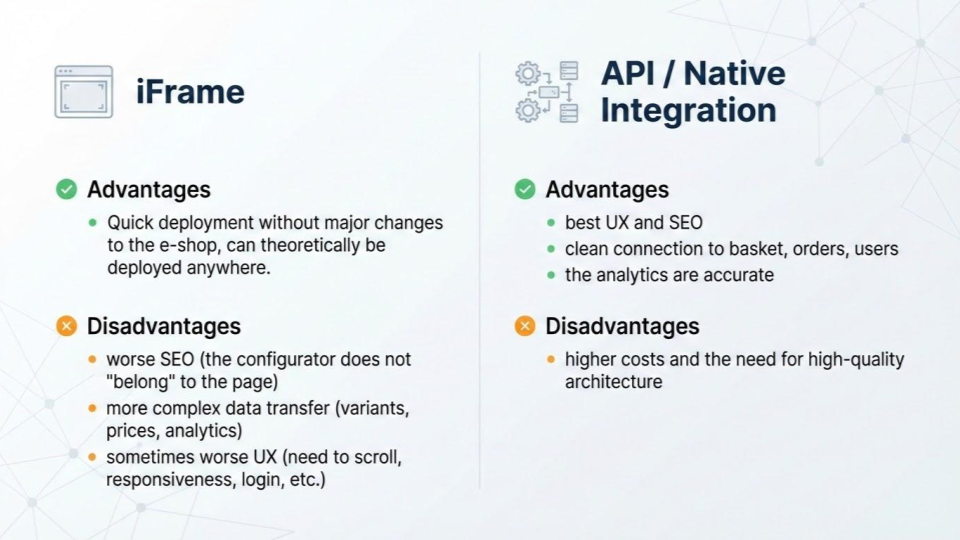
The easiest way to integrate the configurator is when you are building a completely new solution, including a website. However, this is not always realistic. So if you are wondering, "Can the configurator be embedded in my e-shop / website / app?", the answer is yes in 90% of cases. The most common methods are iFrame and native integration.
iFrame
+ Advantages
Quick deployment without major changes to the e-shop, can theoretically be deployed anywhere
-Disadvantages
worse SEO (the configurator does not "belong" to the page)
more complex data transfer (variants, prices, analytics)
sometimes worse UX (need to scroll, responsiveness, login, etc.)
API / Native Integration
+ Advantages
best UX and SEO
clean connection to basket, orders, users
the analytics are accurate
- Disadvantages
higher costs and the need for high-quality architecture
Native solutions are almost always better for SEO and UX for your users. iFrames are often good for MVPs or in places where UX is not so critical.
way to integrate the configurator
Data is fundamental, and without the right information, both the configurator and the business suffer
The following applies to both 2D and 3D, but twice as much for 3D.
With 2D, it's mainly about consistent rendering, the same angle, the same light, the right layers.
For 3D, topology, UV maps, textures, materials, optimization, part hierarchy
When data is poorly prepared, there aren't many options for creating a great configurator. That's why you shouldn't underestimate this part and should really take care of your data.
GLB/GLTF as a standard for the web and why it is practical
We can process many 3D formats, but GLB/GLTF is currently the best option for the web for the following reasons:
it's standard for the web
is compact
carries the hierarchy of objects and often also materials / textures
may contain "connection points" (in practice, sockets / anchors / pivots are often used)
Example on an office chair product
the model has a basic frame (seat, legs, backrest)
individual variants of parts "click" into defined positions in the background
the user simply switches between variants and the browser assembles the final model.
As far as textures are concerned, ideally the texture is already in GLB and only what is to be rendered to the user is switched (an alternative is a global set of materials for product lines or product collections, which is typical for chairs, sofas, etc.).
How rendering works in a browser and why optimization is crucial
Rendering takes place on the user's computer, or rather in their browser. The configurator typically performs the following steps:
loads the product base
download the necessary parts
put them together according to the selected variants
monitors performance (LOD / compression / lazy-loading, etc.)
Of course, models are primarily optimized at the input stage, i.e., by the company that creates your models.
This is done because:
Large models = long loading times = users leaving
Mobile devices have GPU and memory limitations.
The goal is "I can see at least something quickly" + "it gradually becomes clearer."
What happens in the background - pre-calculation, logic, and configuration preparation
This is a part that the end user basically never sees, but it is important for understanding what the configurator does and how it works. We are primarily talking about:
monitoring configurator rules (what can / cannot be configured, what are the individual steps)
price lists and price levels (retail / wholesale)
availability (warehouse, production, and can also be handled interactively in several ways)
outputs (BOM, PDF, order)
Pre-calculating various parameters to increase the speed and responsiveness of the configurator (e.g., prices for individual clients or variants, total prices for different configurations, validation of variants to prevent variants that are out of stock from being offered, etc.).

Final ideas and practical takeaways
The configurator pays off when you need to simplify / automate product selection for your customers and at the same time want to increase customer confidence and certainty of choice. Furthermore, if you want to reduce the burden on your internal departments, including sales (due to repeated inquiries), and want to continue to scale sales without everything being handled manually by sales or support.
The greatest return on investment comes when the configurator seamlessly integrates to your real-world processes, i.e., working with product visualization, pricing, orders, inventory, shipping, etc. This allows us to automate part of the entire process.
A properly designed and functioning configurator is a connected vessel containing a wealth of information. It is important to correctly determine what the configurator should do in the first place and how it should help your business achieve its goals. It is crucial not to underestimate the work involved in data management and to choose whether the configurator will manage the catalog itself or take data from your ERP or other sources as the sole source of truth.
When the data is ready and the logic is well designed, the configurator and your process automation can be developed over the long term.
We are happy to help you with the implementation of your configurator. If you need help, please let me know.
Frequently Asked Questions
Tools that create 3D product configurators are typically web 3D engines and rendering frameworks that work directly in the browser. They allow developers to load models, switch parts, and control configuration logic. In the projects, these tools must handle product structure, configuration rules, performance optimization, and integration with pricing or ERP systems. The choice always depends on how complex the product is and how deeply the configurator needs to connect to business processes.
Technology solutions with 3D configurators usually combine a web 3D engine, prepared product models, and backend logic. The 3D engine displays the product in the browser, while the configurator controls which parts can be combined and how the product changes visually. In real projects, these solutions also connect to pricing, availability, and product data. The visualization reflects real configuration rules.
There is no single best 3D product configurator that fits every business. The right solution always depends on the type of product, level of customization, data quality, and how deeply the configurator needs to connect to internal systems such as ERP, pricing, or production.
Some companies use ready-made configurator platforms that can be deployed quickly and work well for simpler products. Others require custom-built configurators when products are complex, contain many configuration rules, or must be connected directly to business processes and production workflows.
In practice, the best configurator is the one that fits your product logic, loads quickly in a browser, and integrates reliably with your existing systems.
A 3D configurator allows users to customize a product and immediately see how it looks in different variants. It helps customers better understand product options and makes decision making easier.
For companies, it helps apply configuration rules consistently and connects product selection with internal systems such as pricing or ordering.
An exceptional 3D configurator follows defined product rules and responds predictably to user selections. Users should clearly understand how the product changes without delays or unexpected behavior.
From a business perspective, it must use accurate data and support internal processes such as pricing or order handling. The configurator should remain maintainable as products and workflows evolve.
A configurator simplifies product selection and reduces the need for repeated explanations between the customer and the sales team. It helps prevent invalid combinations and keeps configuration rules consistent. Also it reduces manual work and makes pricing and product data easier to control. When connected to internal systems, it also supports smoother order processing and better visibility across the process.
 Kubernetes
 React
React TypeScript
 Node.js
 Docker
 GraphQL
 Next.js
 Vue.js
 JavaScript
 WebGL
WebGL Unity
Unity


New Articles
New blog posts you may be interested in

Quote automation for manufacturers: what changed in the last year
Manufacturers do not lose days on quotes because pricing is hard. They lose them because someone has to turn drawings, emails and spreadsheets into a clean list before pricing can even begin. That manual step is finally small enough to automate.
Read more
Finance + Operations Alignment: What Actually Improved
When finance and operations run in separate realities, companies usually pay twice, first in time, then in errors. This case explains what improved after aligning dispatch, document flow, and invoicing readiness.
Read more
What Changed After Moving to Reservation Lifecycle Control
This case outlines practical change after moving from volume-push behavior to controlled reservation lifecycle management. The goal was not another dashboard. The goal was to change operational decision quality over time.
Read moreRead also
Recommended reads for You
Quote automation for manufacturers: what changed in the last year
Manufacturers do not lose days on quotes because pricing is hard. They lose them because someone has to turn drawings, emails and spreadsheets into a clean list before pricing can even begin. That manual step is finally small enough to automate.
Read more
How companies lose control: too many tools, too many Excels, too many versions of the truth
Many companies don't screw up their digitalization by doing nothing. Quite the opposite. They gradually buy a series of tools, each of which solves a small part of their operation. But over time, they discover that instead of one functional system, they have fragmented processes, unreliable data, and people who keep their own Excel spreadsheets to themselves just to be safe.
Read more
Why Do Digital Transformation Projects Suffer such High Failure Rates?
Digital transformation is a priority for many companies, yet most initiatives still fail to deliver the expected results. Based on Moravio’s hands-on experience and insights shared by Dennis Fino, this perspective reflects what teams often overlook long before technology becomes the issue.
Read moreMore context helps
Describe the situation
A few useful details help us prepare: who is affected, how the work happens today, what has already been tried, and why this matters now.