
Digital Twin Software for Warehouses and Manufacturing
Warehouse simulation · Production & machine twins · Scenario comparison · 3D & physics modelling
Model a warehouse, production line or machine using real operating data and engineering rules. Compare layouts, capacity, equipment and process changes before you commit to them on the floor.
Should the new hall have four aisles or five?
Will one more press remove the bottleneck or just move it? Can the current forklift fleet handle the seasonal peak? Today these questions get answered by gut feel and vendor brochures.
Hardware decisions run on gut feel.
A new line, racking system or AGV fleet costs millions, and the business case comes from the equipment vendor's own slides.
Layout changes are tested live.
The only way to try a new material flow is to rearrange the hall and hope. If it fails, production pays for the experiment.
Nobody sees the whole flow.
Stock levels sit in the WMS, orders in the ERP, throughput in a report from last month. There is no live picture of how material actually moves.
Intralogistics lives in heads and spreadsheets.
Shift plans, buffer sizes and routes are set by experience. The experience is real, but it retires with the person.
Peaks hurt every year.
The seasonal wave is known in advance, yet every year it produces the same firefighting, overtime and delayed orders.
Start with one decision you need to verify, then model the parts of the operation that affect it.
Layouts & storage
Compare aisles, racks, buffers and storage configurations.
Material flow
Model receiving, picking, routing and dispatch under real order volumes.
Equipment
Test cranes, conveyors, AGVs or forklifts before changing the physical setup.
Capacity
Check throughput, peaks, shifts and future volume against the current system.
Production lines
Find bottlenecks and compare line changes against cycle-time and output targets.
Machines
Model movement, handling times, utilisation and operating limits.
Hardware changes
Measure what another machine, carriage or equipment upgrade changes.
Process scenarios
Compare shifts, sequencing, buffers and higher production volumes.
A Digital Twin for an Automated Warehouse
For a European manufacturer of automated warehouse systems, we built a configurable 3D warehouse and crane model with a physics-based simulation core. The team can compare layouts, operating strategies, maintenance scenarios and hardware changes before the physical system is built.
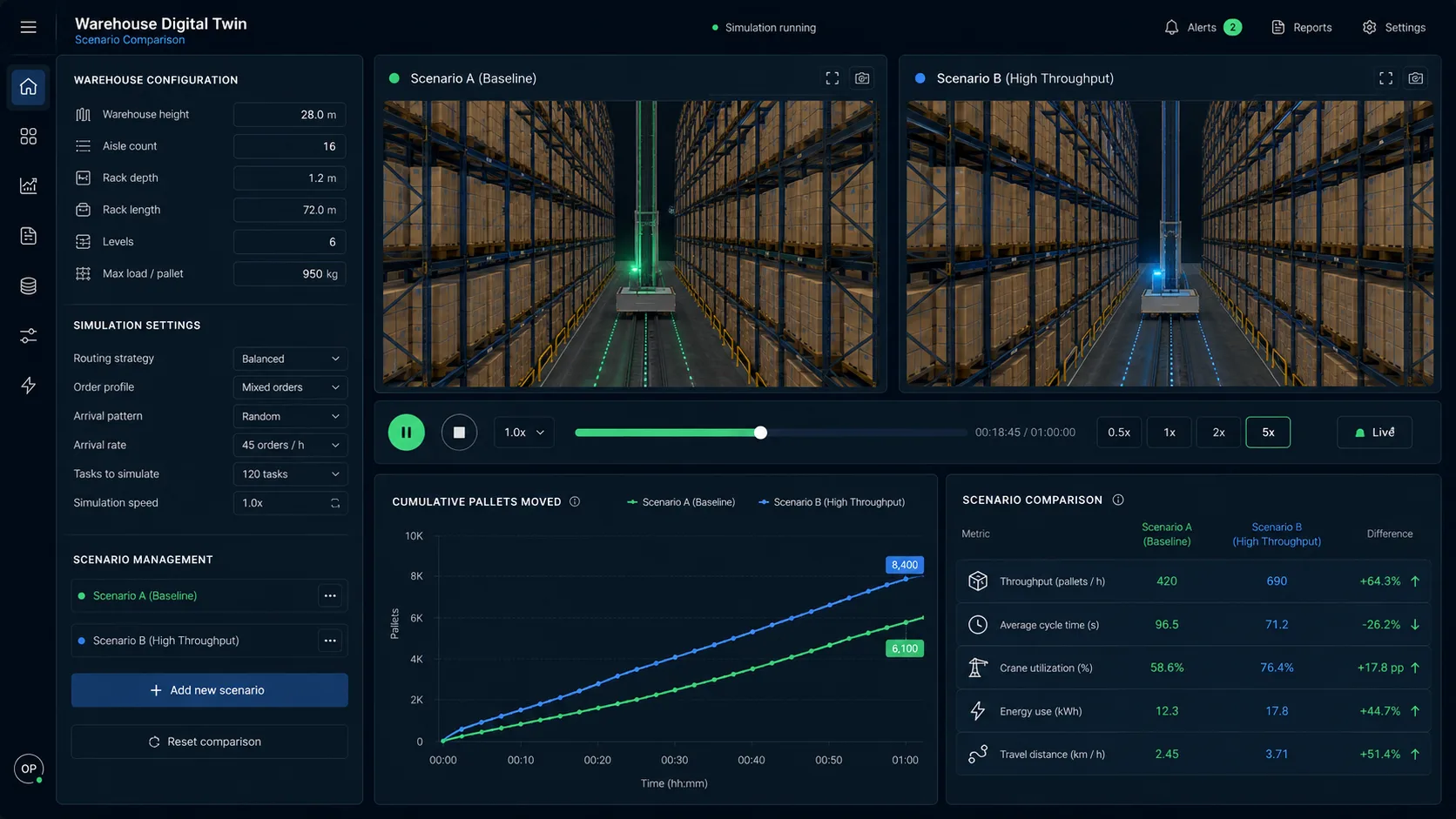
- Minutes
- to model a new warehouse and read its throughput
- 13%*
- throughput difference between two simulated picking strategies
- 17×*
- modelled cost gap between preventive replacement and failure
- +24–30%*
- modelled throughput gain from one hardware change
*Simulation outputs on a modelled warehouse.
Use the model at the point where a physical decision is expensive, slow or difficult to reverse.
Before investment
Compare layouts, equipment and capacity before a physical change.
Engineering & sales
Configure a customer-specific system, calculate performance and show it in 3D.
Operations
Connect operational data to track throughput, flow and exceptions.
Maintenance
Compare downtime and maintenance scenarios before a failure becomes expensive.
The model starts with the process and the decision it needs to support.
- 01
Map the operation
We define the process, machine behaviour, constraints and the question the model needs to answer.
- 02
Build and validate
We use operating data and engineering rules, then check the model against a known process or historical period.
- 03
Run scenarios
Change layouts, equipment, strategies, shifts or volume and compare the outputs.
- 04
Decide and extend
Use the model for the decision at hand, then connect live data or add modules where they add value.
Start With the Data You Already Have
A useful first model can often start from order history, stock movements, layout drawings and shift data. Your ERP or WMS stays the source of truth. Sensors are added when live machine data changes the decision.
Existing systems stay in place · On-premise available · Sensors when useful · Client-controlled data
- ERP
- WMS
- MES
- CAD
- CSV
- Machine data
DIGITAL TWIN
- Simulation
- 3D
- Scenarios
- Dashboards
Why Build Your Digital Twin With Moravio
Business decision first
We define the decision first, then build the model around it.
Engineers in the discussion
The people who design the model join the technical conversations and can explain how each calculation works.
Independent modelling
Moravio sells software, not warehouse hardware or production equipment. The model can compare options without tying the answer to one equipment vendor.
Built to stay under your control
The solution can run on your infrastructure and work with the systems you already use. The code and repository stay with your team.
Digital Twin FAQ
What data do you need to build a digital twin?
Usually order history, stock movements, layout drawings, shift plans and relevant machine parameters. We map the process first so every data request has a clear purpose.
Do we need sensors or IoT to start?
No. Many useful models start with data already available in ERP, WMS or production records. Sensors become useful when the model needs to reflect current machine behaviour or operating conditions.
Does a digital twin replace our ERP, WMS or MES?
No. Existing systems remain the source of truth. The twin reads the data it needs and can send outputs into existing workflows without replacing the systems your team already uses.
Can the solution run on our infrastructure?
Yes. The model and its data can run on your servers when required. This is useful for sensitive layouts, customer data and engineering IP.
How long does a first simulation take?
A small, clearly scoped first simulation can often be ready within a few weeks. The exact timeline depends on the process, available data, engineering rules and required integrations.
What does the first step look like?
We map one process or decision, define the minimum useful model and agree on the inputs and output to validate. For a bounded scope, we can define a fixed-price first step before a larger system is considered.
More context helps
Describe the situation
A few useful details help us prepare: who is affected, how the work happens today, what has already been tried, and why this matters now.